Turning a Man with a Dog into Pixel Art by diffusion
Nov 2026
Sunday morning, coffee, Hugging Face’s featured models. Today’s pick led to a pixel-art generator, and I got stuck on a dumb thought: Can it draw a 16x16 pixel picture of a man with a dog? I tried to read the architecture, and it requires a bit more learning to finally answer. Let us start with part 1.
The featured model on Hugging Face is Tessera-small. It is a 47.6M-parameter model by Jagrat Patel, and its in-browser ONNX port by cfahlgren1, which powers the Slack Moji demo. The canvas is so small that you can count every pixel and watch quantization, sampling and training data each leave their mark.
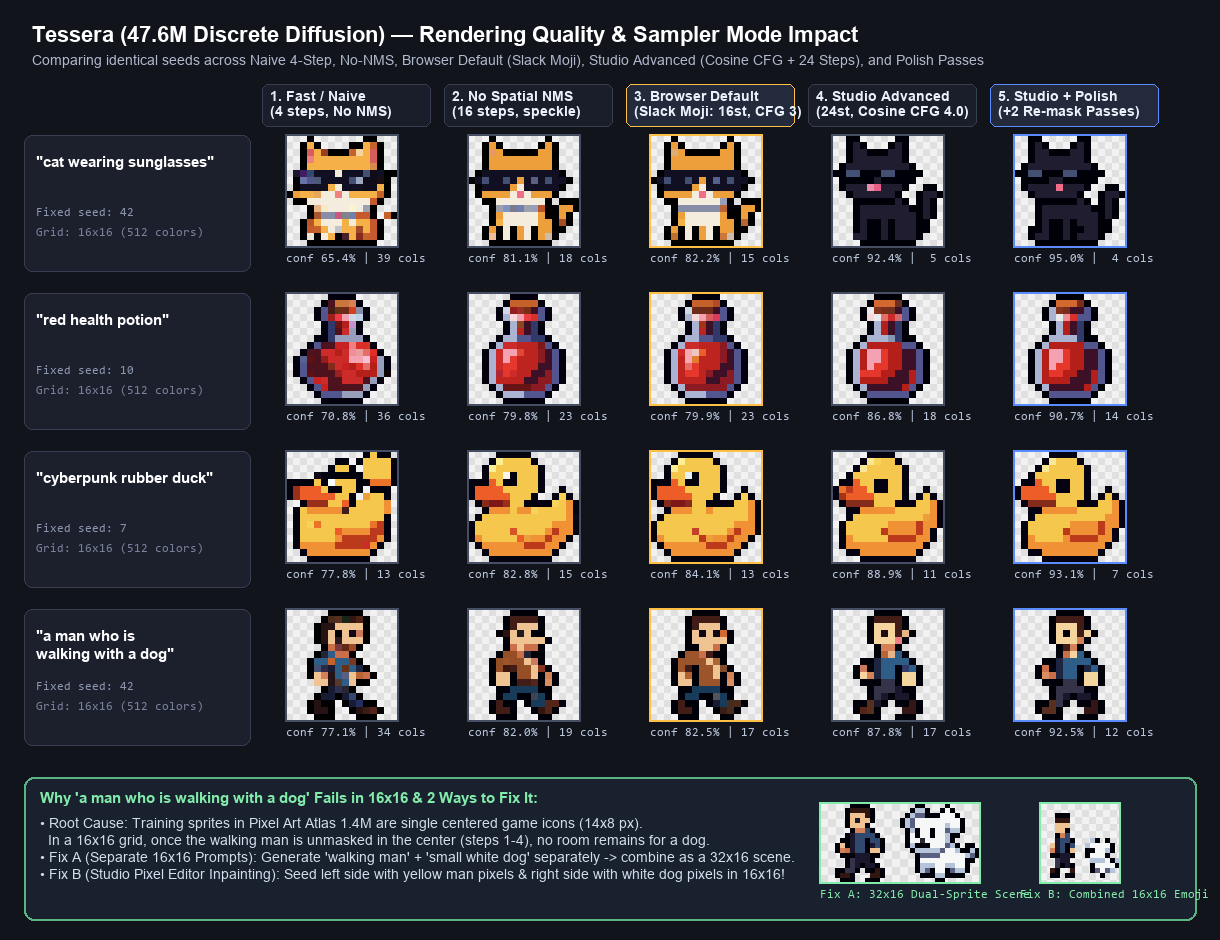
Same prompts and seeds, five sampler settings. Click for the full-size chart.
A pixel called MASK
Tessera is a masked diffusion model over discrete tokens. To see what that means, think of a picture as a collection of pixels, much like a text is a collection of words. In Tessera, each pixel is one of 512 colours, just like each word in a language model comes from a fixed vocabulary.
Tessera uses one extra token that is not a colour, the mask token. To understand why, take the sentence “The dog ___ a duck.” You can guess the missing word: chases, maybe bites. Tessera learns the same game for pictures: hide some pixels, guess the missing colours. During training, the forward process of discrete diffusion gradually turns some colours into [MASK] until the whole image is in the absorbing, fully masked state.
To draw a new picture, it starts with every pixel masked and fills the canvas step by step. The model does not learn where to put the man or the dog. It learns what colour might belong in a pixel after seeing the prompt and all the colours already known around it.
Where the chessboards come in
To draw a sprite:
- A small tokenizer splits the prompt into 24 text tokens, padded if necessary. A tokenizer and an embedding model are separate pieces: the tokenizer makes chunks of text, while CLIP turns those chunks into number vectors. CLIP is the frozen text encoder here; Tessera does not change its weights. In a high-dimensional embedding space, text with similar meaning tends to end up near one another because the model learned from text and image pairs. CLIP also uses this arrangement for both of the pair’s items, unlike the Yasiv graph I once wrote about: in that graph, books were nodes and co-purchases formed visible edges. Here, a text chunk is itself a point in a much larger space, and there are no edges to inspect.
- The 24 text tokens and the 256 pixel tokens enter one bidirectional transformer with an hourglass layout: 2 blocks at full resolution, 8 blocks on 2×2 patch-merged tokens, then 2 more at full resolution. Merging 2×2 patches turns the 16×16 canvas into an 8×8 grid, so 8 of the 12 blocks literally work on a chessboard.
- Starting from an all-
[MASK]canvas, the model gives every pixel a distribution over colours. It commits the pixels it is most sure about, then gives the remaining positions another prediction. A few large steps are difficult because pixels committed in parallel are only conditionally independent: each head of the duck may look plausible on its own, even if the two heads together do not. That is why careful samplers spread the commitments out and use spatial checks instead of filling the grid in one go.
Training was small too: 82,342 steps of 512 sprites, about 5.5 hours on one NVIDIA RTX PRO 6000 Blackwell. That’s roughly one Sunday morning. On held-out data the model gets 78.8% of masked pixels right.
Quantization: what actually shrinks
To run Tessera in a browser with no inference server, the ONNX port stores the weights as int8. The download drops from 224 MB (the fp16 export) to 115 MB. Both numbers include the CLIP text encoder: the int8 denoiser is 51 MB and the int8 text encoder is 64 MB. So if you multiply 47.6M parameters by 2 bytes, get about 95 MB and wonder about the gap, the gap is CLIP.
Some details from the port that I liked:
- Only storage is int8. Each weight matrix has one scale per output channel, and the weights are turned back into fp32 at inference time, so the math still runs in fp32.
- The convolution weights stay fp16, because per-channel int8 gave wrong WebGPU results for 4D conv weights in onnxruntime-web 1.22. That’s only about 0.3M of the 47.5M denoiser parameters.
Pow(x, 2)was rewritten asx*x, because the original could return NaN on some GPUs for negative inputs.
The outputs barely change. On 8 test prompts, the int8 build and the fp16 export pick the same top colour for 91–99% of pixels. The repo reports about 1 second for 4 sprites on a laptop with WebGPU. On my machine a batch took about 3 seconds.
So the precision of the weights isn’t where image quality is won or lost. Sampling is.
Sampling: where the quality goes
The chart runs the same prompts and seeds through five settings:
- Fast / naive: 4 steps, no spatial NMS
- No NMS: 16 steps, no spatial NMS
- Browser default (what Slack Moji uses): 16 steps, guidance 3, with NMS
- Advanced: 24 steps, guidance ramping up to 4.0 on a cosine curve
- Advanced + polish: the same, plus two extra passes that re-mask and redraw the least confident 8% of pixels
The browser default is already a careful sampler. It commits the most confident pixels first on a cosine schedule, adds annealed Gumbel noise, and runs 3×3 non-maximum suppression, so neighbouring pixels that are both unsure don’t get committed in the same step. Turning NMS off is what makes the first two columns speckle. With only 4 steps, too many neighbours lock in before they can see each other: the cat breaks into 39 colours and the rubber duck grows a second head.
At the other end, more steps and the polish passes clean up stray pixels. The health potion goes from 36 colours in naive mode to 23 at the default and 14 after polishing.
The chart also prints a confidence number under each sprite. It rises from 65–78% (naive) to 80–84% (default) to 91–95% (polished). Take that with a grain of salt: the polish passes redraw exactly the least confident pixels, so the average goes up partly by design. The colour counts and the pictures are the better evidence.
Training: why “a man who is walking with a dog” has no dog
Even with 24 steps and polish, “a man who is walking with a dog” gives me a walking man and no dog. More sampling doesn’t fix it, because the problem comes from training.
Tessera was trained for 30 epochs on Pixel Art Atlas 1.4M. Those 1.4 million sprites don’t come from old games. They were generated from text prompts with Krea 2 Turbo and a pixel-art LoRA, and almost every one shows a single centred subject. The dataset card also warns that the captions describe what the generator was asked to draw, and that colours, counts and other details may not match the picture. So the model saw plenty of prompts that mention two things, attached to pictures that often show one.
It isn’t that the grid is too small. A 4-pixel stick man next to a 3-pixel dog would fit in 16×16. The model simply never learned to draw two subjects. My reading of what happens: once it commits to a centred figure in the first few steps, the rest of the canvas becomes background.
Two workarounds do get a dog, shown at the bottom of the chart. You can generate “walking man” and “small white dog” separately and put them side by side on a 32×16 canvas. Or you can use inpainting, which Tessera supports, and seed the left and right halves of the canvas with man and dog pixels.
What I took away
int8 moved the model from a GPU server into a browser tab with almost no change in what it draws. Sampling choices (steps, NMS, re-masking) changed the pictures far more than quantization did. And neither can add something the training data never showed: in a world of single-subject 16×16 sprites, a man walking a dog is two sprites stitched together.
If you want to play with it yourself: Tessera-small is licensed CC BY-NC 4.0, so it’s free for personal and research use with credit, but commercial use needs a separate licence from the author.